
Download Norton Private Browser – free secure browsing tool
Overview of Norton Private Browser
Norton Private Browser is a free‑to‑download web browser created by Gen Digital Inc., the company behind the trusted Norton security suite. Designed from the ground up with privacy and security in mind, this browser adds a protective layer that many mainstream browsers simply lack. When you launch Norton Private Browser, you instantly benefit from built‑in ad blocking, tracker suppression, anti‑phishing filters, and malware detection.
The tool also includes anti‑fingerprinting technology that prevents websites from building a unique profile based on your browsing habits, making it considerably harder for advertisers or malicious actors to identify you across the web.
One of the most compelling aspects of the browser is its password manager, which stores login credentials in an encrypted vault and auto‑fills them on trusted sites. This not only saves time but also reduces the risk of password reuse or exposure through keyloggers.
Users can switch between popular search engines such as Google, Bing, or DuckDuckGo directly from the address bar, giving you full control over your search experience without being forced into a single provider.
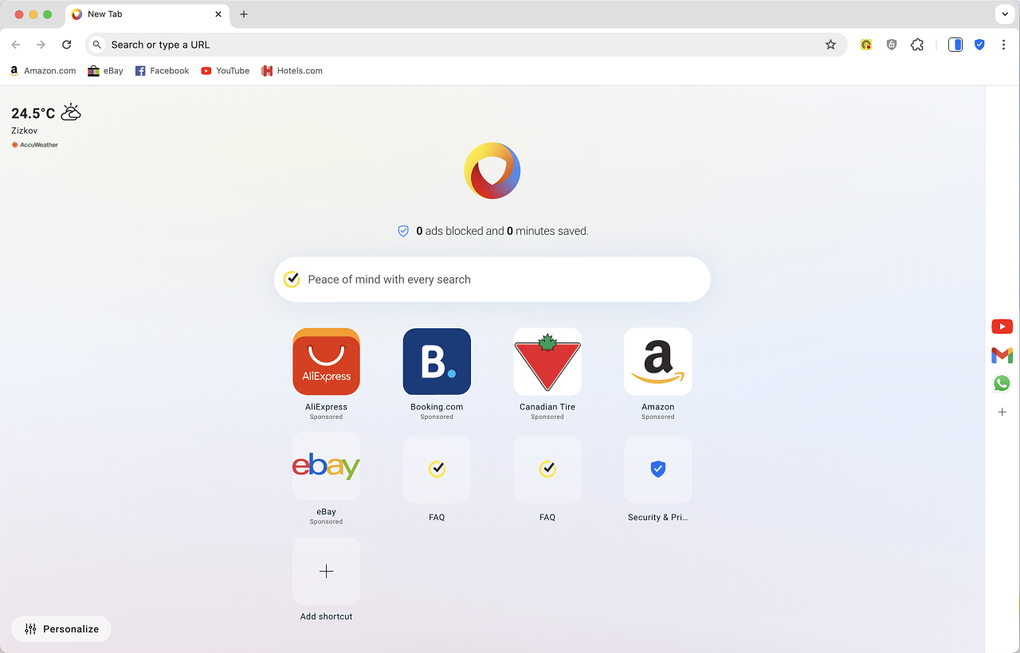
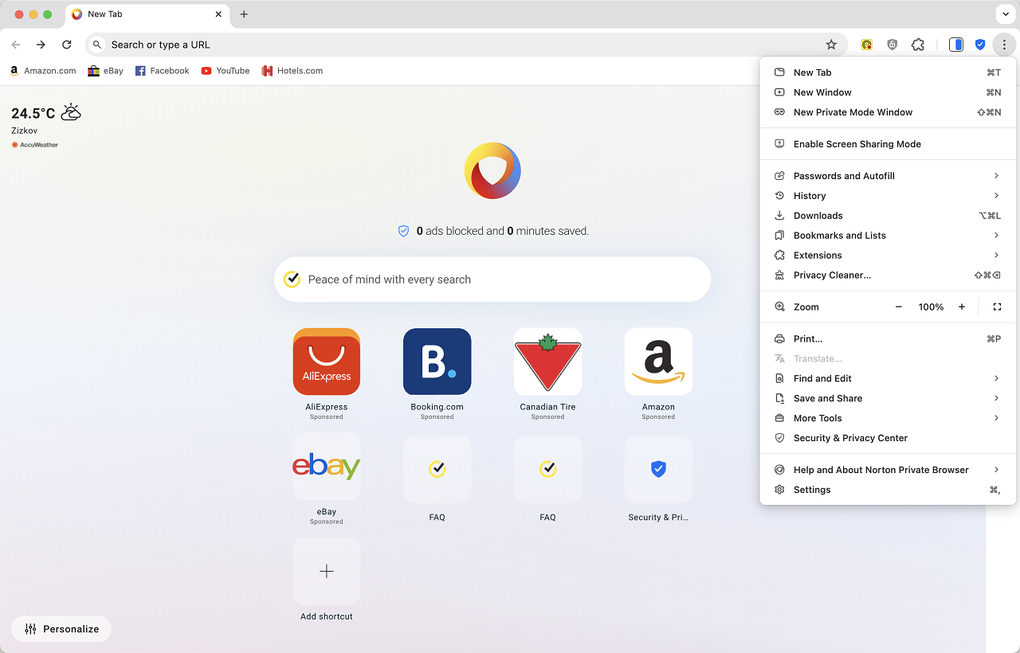
The interface mirrors the familiar layout of leading browsers, so the learning curve is minimal for most users. Navigation buttons, tabs, and a customizable homepage are all present, ensuring that you won’t feel lost while you get used to the enhanced privacy controls.
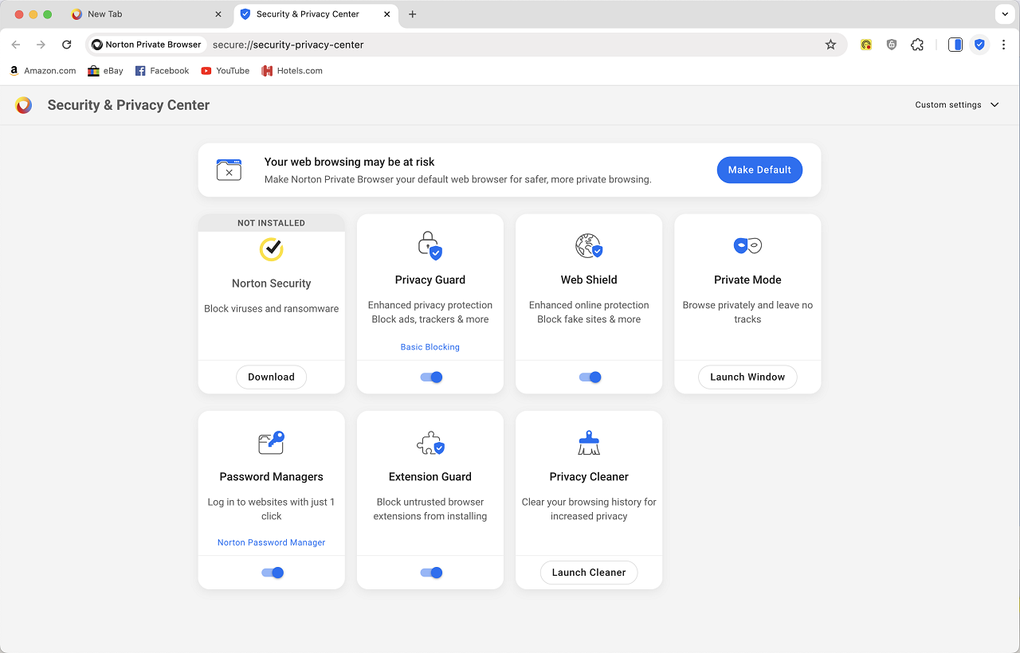
In addition, the Security & Privacy Center provides a single dashboard where you can toggle protection settings, view blocked threats, and adjust performance options to keep browsing fast and secure. Whether you’re shopping online, checking email, or simply browsing social media, Norton Private Browser aims to keep your data confidential and your device safe from harmful web content.
Key Features That Set Norton Private Browser Apart
- Comprehensive Tracker Blocking: Stops advertisers and third‑party scripts from collecting your browsing data.
- Real‑Time Malware & Phishing Protection: Identifies and blocks dangerous URLs, malicious downloads, and fake websites before they can harm your device.
- Anti‑Fingerprinting Engine: Masks browser fingerprints to prevent sites from uniquely identifying you across sessions.
- Built‑In Password Manager: Securely stores and auto‑fills login credentials, encrypted with industry‑standard algorithms.
- Search‑Agnostic Capability: Choose from Google, Bing, DuckDuckGo, Yahoo, or custom engines without leaving the browser.
- Ad & Pop‑Up Blocking: Eliminates intrusive ads and pop‑ups, resulting in faster page loads and a cleaner visual experience.
- Privacy Dashboard: Centralized Security & Privacy Center lets you view blocked threats, toggle protection levels, and manage performance settings.
- Lightweight Performance Mode: Optimizes resources for smoother browsing on older hardware while maintaining strong security.
- Secure Shopping Mode: Detects fraudulent e‑commerce sites and warns you before you enter payment details.
- Regular Automatic Updates: Keeps the browser’s security definitions current without manual intervention.
Each of these features works together to create a layered defense strategy that is rarely found in free browsers. The tracker blocker reduces data leakage, while the anti‑phishing engine actively scans URLs against a constantly updated threat database. The anti‑fingerprinting technology adds an extra veil of anonymity, making it difficult for sophisticated trackers to stitch together a profile of your online behavior.
Moreover, the built‑in password manager eliminates the need for third‑party extensions that could introduce additional vulnerabilities. By offering a choice of search engines, Norton Private Browser respects user preference and avoids the lock‑in effect that some browsers impose. All these capabilities are delivered through a clean, user‑friendly interface that feels familiar to anyone who has used Chrome, Edge, or Firefox, ensuring you get maximum protection without sacrificing usability.
Installation, Usage Instructions, and Compatibility
Getting started with Norton Private Browser is straightforward. Visit the official Norton website or a trusted software repository and click the Download button for your operating system. The installer is a lightweight .exe for Windows, a .dmg for macOS, and an .apk for Android devices. iOS users can download the companion app from the App Store, though full browser functionality is currently limited to Android and desktop platforms.
Step‑by‑step installation:
- Run the downloaded installer and accept the license agreement.
- Choose the installation folder (default is recommended for most users).
- Click “Install” and wait for the process to complete—this typically takes less than a minute.
- After installation, launch Norton Private Browser from the desktop shortcut or start menu.
- On first launch, you’ll be prompted to import bookmarks from other browsers and to set your preferred search engine.
- Visit the Security & Privacy Center to customize protection levels (e.g., strict, balanced, or performance‑focused).
The browser supports Windows 10/11 (64‑bit), macOS 10.14 or later, Android 8.0+, and limited iOS 13+ functionality. System requirements are modest: at least 2 GB of RAM and 200 MB of free disk space. Because it runs on top of the native operating system, Norton Private Browser can coexist with other browsers without conflict.
Once installed, everyday use mirrors that of any modern browser. Type a URL or search term into the address bar, and the built‑in search‑agnostic engine will handle the query. The password manager will automatically suggest saved credentials when you visit a login page.
If a site is flagged as unsafe, a warning overlay appears, giving you the option to proceed at your own risk or return to safety. For users concerned about performance, the “Performance Mode” can be toggled in the settings to reduce CPU usage, especially on older laptops. Regular updates are delivered automatically in the background, ensuring you always have the latest protection against emerging threats.
Pros and Cons – Balanced Review
Pros
- Free to download and use, with no hidden subscription fees.
- Robust security suite (tracker blocking, anti‑phishing, malware protection) built in.
- Anti‑fingerprinting feature adds a layer of anonymity rarely seen in free browsers.
- Integrated password manager saves time and secures credentials.
- Search‑agnostic design lets users pick their favorite search engine.
- Lightweight performance mode works well on older hardware.
- Regular automatic updates keep threat definitions current.
Cons
- Limited iOS support; full browser features are only available on Android and desktop.
- Some users report a short learning curve when adjusting privacy settings.
- Occasional false‑positive site blocks can interrupt browsing flow.
- No built‑in VPN; users must pair with a separate Norton VPN service for complete anonymity.
- Extension ecosystem is smaller compared to Chrome or Firefox.
Overall, Norton Private Browser delivers a compelling mix of security and privacy features at no cost. While it may lack the extensive extension library of larger browsers, its native protections—especially anti‑fingerprinting and built‑in password management—make it a strong choice for users who prioritize safety over a vast add‑on marketplace. The few drawbacks, such as limited iOS functionality and occasional false positives, are outweighed by the peace of mind offered by real‑time threat blocking.
Frequently Asked Questions
Is Norton Private Browser completely free?
Yes, the browser can be downloaded and used without any subscription fees. All core security features are included at no cost.
Can I use Norton Private Browser alongside Chrome or Edge?
Absolutely. Norton Private Browser installs as a separate application, allowing you to keep your existing browsers while adding an extra layer of protection for sensitive sessions.
Does the password manager sync across devices?
The built‑in password manager stores credentials locally on the device. For cross‑device syncing, you’ll need a Norton account with the full Norton 360 subscription that includes cloud sync.
How does anti‑fingerprinting work?
Anti‑fingerprinting masks or randomizes browser attributes—such as canvas data, user‑agent strings, and screen resolution—so trackers cannot build a unique profile based on these characteristics.
Will the browser slow down my PC?
The browser is optimized for performance. Its “Performance Mode” reduces CPU usage, and the built‑in ad blocker actually speeds up page loads by preventing unwanted scripts from running.
Is there a VPN integrated into Norton Private Browser?
No, the browser does not include a VPN. However, Norton offers a separate VPN service that can be combined with the browser for full anonymity.
Conclusion – Secure Your Browsing Experience Today
Norton Private Browser stands out in a crowded market by delivering enterprise‑grade security features to everyday users without charging a dime. Its combination of tracker blocking, anti‑phishing, anti‑fingerprinting, and an integrated password manager creates a robust shield against the most common online threats. While the lack of a built‑in VPN and limited iOS support may be drawbacks for some, the overall value proposition is strong—especially for users who want a hassle‑free solution that works out‑of‑the‑box.
If you’re concerned about privacy, shop online, or simply want to surf the web without the constant worry of hidden trackers, give Norton Private Browser a try. Download it now, configure your preferred security level in the Security & Privacy Center, and enjoy a faster, safer browsing experience. Secure your digital life—download Norton Private Browser today!







